






MyCourses: Multilingual workspace

In short
- Content visibility can be filtered based on the user’s language selection.
- Access to content can be restricted according to the selected language.
- With the editor’s ‘Generate text with AI’ tool, you can create language translations.
- Additional services such as Aalto AI Assistant, Panopto, and ThingLink support your work.
Multilingual workspace
There are several options for implementing multilingualism in the MyCourses workspace, and three different methods are presented below.
A. In a multilingual workspace the content is written in multiple languages, and students see the content based on the language choice of the interface.
In this model, you bring the content into one single object in multiple languages, and students see only the content set for the language they use in MyCourses. This model works well if the course content is mainly written on MyCourses pages and uses MyCourses' activities.
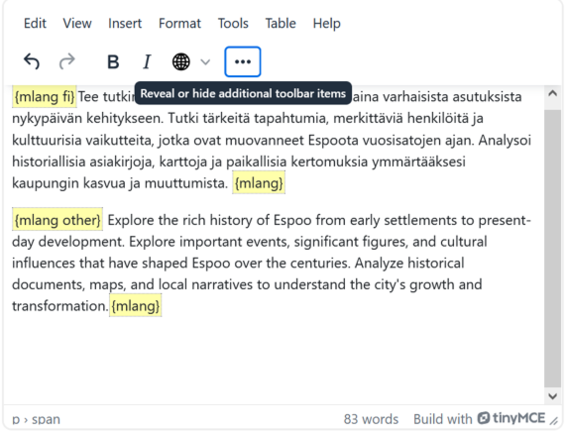
Multilingualism is implemented using {mlang} tags in the text editor to separate content in different languages. You can add the tags either by typing them yourself or using the 'Add multilang tags for content' button (globe icon) in the text editor. Read more in the section: Multilingual course workspace, using mlang codes.
B. Restricting content based on language, two different ways
You can use access restrictions to show content to students based on their language choice.
1) Create groups in the workspace for students of different languages (e.g. Finnish and English). Create the content (instructions, activities, materials) separately for each language group and place them in sections according to the language groups for easier management. Restrict access to sections based on language groups (Restrict access>Group). Or:
2) Create the content (instructions, activities, materials) separately in different language versions and place them in sections according to the language versions for easier management. Restrict access to sections based on the language they use in MyCourses (Restrict access>Language). Note that in this case, if a particular language does not have its version, they will not see the content.
Read more: Restricting visibility in sections, materials, or activities.
C. Multiple course spaces, separate workspace for each language (in rare cases)
This model is the most laborious and suits only specific cases, rarely used in degree courses. The challenge with separate workspaces is the complexity of maintenance and the findability of workspaces for students. Different workspaces have separate assessments, so assessments and grades have to be collected from multiple course spaces.
Multilingual course workspace, use of mlang codes
NOTE! The 'Add multilang tags for content' button is only in the TinyMCE text editor. If you can't find the button in your MyCourses editor view, click your profile dropdown > Preferences > Editor preferences and choose the default editor or TinyMCE editor.
Note that the mlang button is not available for an activity/section heading/title, so you need to add the mlang tags yourself.
The mlang button simplifies the use of the mlang filter and enables the creation of language versions within the same activity/section etc. In practice, the text is written in the MyCourses text editor as follows:
- {mlang fi} sisältöä suomeksi {mlang}
- {mlang en} content in English {mlang}
- {mlang sv} innehåll på Svenska {mlang}
- {mlang other} content for other languages {mlang}
When the text is saved, it is displayed in the language corresponding to the user's MyCourses language selection. Note that if you write content only in English and Finnish, you should use {mlang other}{mlang} and {mlang fi}{mlang} to display English text to students using MC in Swedish. Using the mlang en & fi filters leaves the description fields empty for Swedish user profiles. If mlang is already in use for all three languages, {mlang other} will not work; this situation may inadvertently occur if you use AI-label elements on the page, as three languages are automatically encoded into these elements; if necessary, edit the label element.
Text that does not use mlang filters at all will be visible for all language selections.
Read more about the mlang filter

Multilingual glossaries
MyCourses can be used to support the creation of collaborative terminology banks that teach students field-specific vocabulary in Finnish, English and Swedish. Read more about different alternatives to create multilingual glossaries.
Multilingual assessment
There are different ways to use MyCourses multilingual features when creating assessment activities. Read more and learn how to plan your course's multilingual assessment.
Create text with AI in the text editor – support for making translations
The TinyMCE editor has a built-in AI Generate text feature, which can be utilised for creating multilingual content. It allows you to create drafts, summaries or translations directly in the editor without separate tools. This speeds up text production and makes it easier to build multilingual teaching materials.
Note that translated text should be checked particularly for professional vocabulary and terms.


Find Aalto's support tools and instructions for translating content, such as course pages.
Tools and tips for multilingual teaching
Aalto University aims to deliver a multilingual and inclusive educational experience for students as well as for all who take care of teaching duties. Teaching at Aalto is organised in Finnish,...
