






MyCourses: Setting up the workspace

In short
- You can access MyCourses using Aalto or Haka account at mycourses.aalto.fi.
- A workspace is automatically created for each course implementation based on the data from Sisu.
- Forgotten password? → password.aalto.fi
- MyCourses uses roles for different purposes.
- By default, guests (users who are not logged in) do not have access to MyCourses workspaces.
Course-specific workspace
MyCourses is a Moodle-based learning environment, which can be accessed with Aalto- or HAKA-account. MyCourses is integrated with the study information system Sisu: course workspaces are created automatically based on the data from Sisu. Students and teachers receive workspace membership (role) based on the data from Sisu.
Each course implementation has its own workspace. You can find your courses in MyCourses from the list of My own courses in the upper row.
MyCourses imports course information from Sisu, including the course name, calendar events (such as lectures and exercises), and user details for both students and teachers.
The workspace initially includes just one section and an Announcements area. Teachers have the flexibility to customize the workspace according to their preferences. The course workspace is versatile, enabling announcements, discussions, material sharing, assignment management, and grading. Course evaluations are conducted within MyCourses, and overall grades can be transferred to Sisu.
If you're unable to access your workspace after logging in, verify that you are registered as the course teacher in Sisu. If you are a course assistant and cannot access the workspace, please contact the course´s responsible teacher.
Students are assigned a student role in the workspace once they have registered in Sisu and their registration has been approved.
If you can access MyCourses but cannot locate your course workspace, please contact Teacher Services. We will verify that the workspace has been created based on the data from Sisu.
- From the academic year 2026–2027 onwards, a MyCourses workspace will be created for all combinations of a course unit’s assessment item and implementation type, except for combinations where the course unit’s assessment item is participation in teaching and the implementation type is exam, online examination, or electronic exam.
Explore:
- MyCourses learning environment introduction video, in English (7 min)
- Study the basics of using MyCourses independently, duration approx. 2-3 hours:
Course: MyCourses basics self-study course 2024 |
More information:
- Sisu instructions for teachers: frontpage|Aalto
- How MyCourses workspaces are created: Implementation of teaching for teachers | Aalto University
How to log in
Log in to MyCourses using your Aalto-account. The system can be accessed with accounts from all Finnish universities and higher education institutions (so-called HAKA-account).
Forgotten password? → password.aalto.fi
It is not possible to create local accounts in MyCourses. Under certain conditions, external users can be granted guest credentials from Aalto University.
Browser requirements
We recommend keeping your browser up to date. We regularly test MyCourses on Safari, Firefox, Internet Explorer, and Edge.
The current version of Moodle in MyCourses is 5.1 (starting from 6/2026).
Read more: https://moodledev.io/general/releases/5.1
Participant enrolment methods
Participants are added to MyCourses workspaces through Sisu registration. Participants can also be added manually or students can enrol themselves in the workspace. Manual enrolment and self‑enrolment are used when information is not brought in through Sisu.
As a teacher, you can see the course’s participant list, which shows participants’ name, student number, email address, role, group and most recent visit to that workspace. You can filter participants by initials. The participant list is not visible to students.
Read more about workspace roles
Sisu‑based user roles
In general, user roles are managed in Sisu, which is the master system for teaching and studying. When students have registered for the course in Sisu, they get an access to the course workspace with the Student role.
Participants in MyCourses workspaces are synchronised several times an hour. This means that if a user is added to the course in Sisu, they will be added to the MyCourses workspace within the next 15 minutes.
Note that there are two different ways in Sisu to add registered students to a course: standard registration and registration with direct confirmation. Standard registration means that the course has a limited number of participants and the teacher accepts the participants. In this case, participants are transferred after the registration period ends through a teacher approval procedure. Registration with direct confirmation means that everyone who wants to join is accepted, so students are transferred to MyCourses immediately upon Sisu registration.
Read more: Basic information on registration and setting additional information questions in Sisu for teachers
Self‑enrolment
Self‑enrolment can be used in workspaces that do not have Sisu integration. For self‑enrolment, you can add an enrolment key (password) and a group in which the student is registered. A group‑specific enrolment key also gives the student group membership in the workspace. It is advisable to set an end time or a removal time for inactive participants in the self‑enrolment settings so that participants do not remain in the workspace for years.
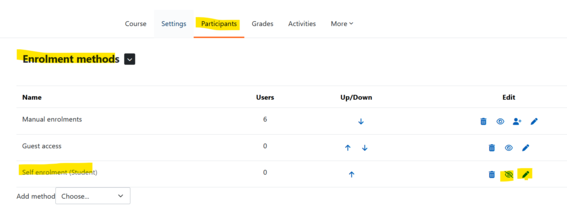
Enable self‑enrolment under the Participants tab → Enrolment methods section → click the eye icon next to self‑enrolment. You can edit the password and other settings via the cogwheel icon. See the image below.
Read more:
Moodle.org: Self‑enrolment
Adding participants manually
In some cases, you may want to add people to the course workspace and give them different user roles. You can add members to your workspace manually as follows:
- From the course navigation on the front page, select Participants
- Click the ‘Add participants’ button → Select a role (Student, Teacher (MC), Teacher)
- Search for the person and select the correct one → click the ‘Add users and/or cohorts’ button.
- Under ‘Show more’ you can define when the user’s membership in the workspace will end.
Note that the person must log in to MyCourses at least once before they can be added to the course workspace, that is, before they can be found in the search.


Roles and content visibility
User must have a role in the workspace in order to participate in activities (discussions, tasks). By default, Aalto/HAKA users can see the contents of workspaces, but they cannot participate in activities or see discussions or notifications, for example.
Roles in MyCourses are typically automated based on Sisu. Participants can also be added manually to the MyCourses workspace or via self-registration key in exceptional cases.
Teachers can view the Participants list, which includes students and teachers, sorted by roles, groups, and last visit time. This list is not visible to students.
The participants list can be accessed from the menu on the Main course page.
Teachers can restrict access to the workspace content.
Non-logged-in user or Guest
A guest is a non-logged-in user, i.e. "anyone"
- The guest does not have a role in the workspace and cannot participate in activities or discussions.
- Guest access is no longer the default setting in new workspaces (since 2024). However, the teacher can allow guest access: Participants -> Enrolment methods -> drop-down menu -> Guest access, enable the eye icon.
Logged-in Aalto / HAKA user (authenticated user)
- A logged-in Aalto or HAKA user can view all workspaces and materials that are not restricted in visibility, but they cannot participate in activities or discussions.
- Read more: Restricting content visibility only for students of the course

Course workspace roles
Student
- A student is someone enrolled in the course and receives this role through registration in Sisu.
- Students can engage in activities such as submitting assignments and participating in discussions.
- Teachers can view students on the Participants list, along with their roles and any group memberships.
- A student's role is suspended if they cancel their registration for the course after the registration period has ended or if they discontinue the course in Sisu.
- Read more about registrations in Sisu: Sisu instructions for teachers: frontpage | Aalto University
Teacher
- The teacher's role is assigned through Sisu.
- Teachers can modify the workspace and evaluate assignment submissions.
- It is also possible to add this role manually in MyCourses.
Teacher (MC)
- This role is equivalent to the teacher role, but it is added manually in MyCourses.
- The Teacher (MC) can modify the workspace and evaluate assignment submissions.
- Note: The Teacher (MC) role does not have access to course feedback or certain activities, like FeedbackFruits.
Non-editing teacher
- In this role, the teacher can evaluate assignments but cannot edit the workspace.
- The role can be added in MyCourses.
Course assistant (workspace assistant)
- This role has the same rights as the teacher but is added manually in MyCourses and can be used, for example, when preparing the course workspace.
Category assistant
- The category assistant has editing rights for all courses in the category (school or department level).
- The role is granted upon request with the approval of the school or department head. The role is intended for service staff who may be responsible for course support functions.