






IT Service Desk contact information and service hours
Contact IT End User Support for help or information on Aalto University IT. You can visit the service desk during opening hours or ask for help by email, telephone or chat.
IT services have laptops that Aalto University students can loan:
A teacher orders the loan device for a student with a service request through the self-service portal.
Note: Please order the loan device about one (1) week before it is needed. This ensures that IT Services can check that a device is available and do the necessary preparations on the device.
You can order 1 to 5 devices at a time.
Order the devices with a service request through the self-service portal using the Loan Workstation for Student form.
Fill in the following information on the order form:
Add information on any additional software installations required for the device in the Additional Information field.
The Safe Exam Browser program (SEB) and Microsoft Office package are automatically installed on the device.
Log in to the device with your Aalto username and password.
The Safe Exam Browser program (SEB) and Microsoft Office package are automatically installed on your loan laptop.
Need Adobe applications? Access them, and many other applications, via our VDI (Virtual Desktop Infrastructure) from your home computer.
If you need access to a specific application, ask your teacher to notify IT services when ordering the device. The teacher can add this information in the Additional Information field of the order form. IT services will check if the application can be installed.
Need Adobe applications? Access them, and many other applications, via our VDI (Virtual Desktop Infrastructure) from your home computer.

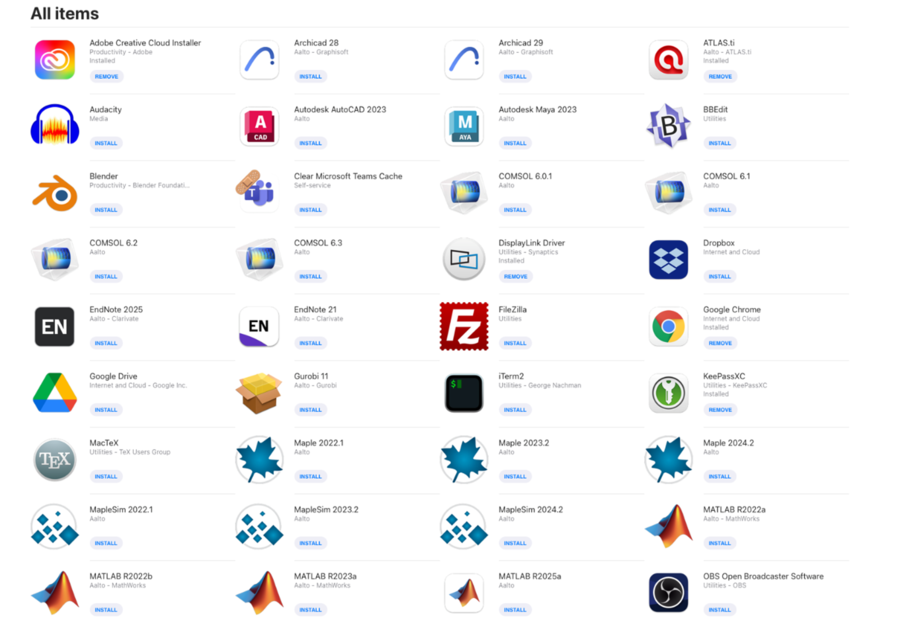
You can install software on your loan device from the Aalto Managed Software Centre.
Managed Software Centre includes, for example, the following applications:
Adobe Cloud – Atlas Ti – Matlab – MacteX – Zoom – Autocad
Should you have any questions, please contact IT Service Desk (servicedesk@aalto.fi).

Contact IT End User Support for help or information on Aalto University IT. You can visit the service desk during opening hours or ask for help by email, telephone or chat.

Follow this guide to take an Aalto Mac into use. The setup requires an internet connection, but the device does not have to be within Aalto network. The initial setup takes about 30 minutes with a modern internet connection.
You can install or remove optional programs on an Aalto Mac through application distribution of the Managed Software Centre.