






Mentimeter – interactive presentation tool
Using Mentimeter
The use of Mentimeter is recommended instead of other external presentation polling tools. This ensures that the tool in use is supported by IT Services and has been reviewed in terms of data security and data protection.
Mentimeter is used via a web browser. The presenter creates polls in Mentimeter and shares a link or code with participants, allowing them to respond to the polls using their own devices. Mentimeter can be used, for example, in lectures and seminars, team meetings, strategy workshops, trainings, kick-offs, as well as customer and stakeholder events.
Note: Mentimeter’s AI assistant is not available at Aalto.
Getting started
Mentimeter works in the web browser without any separate installations.
-
If you do not yet have a Mentimeter account, you can create one here:
https://mentimeter.com/join/aaltouniversity. Use your Aalto email address as your user ID.If you already use Mentimeter with your Aalto credentials, your account will be transferred under Aalto’s general licence. Users will be informed of the transfer by email before the change takes place.
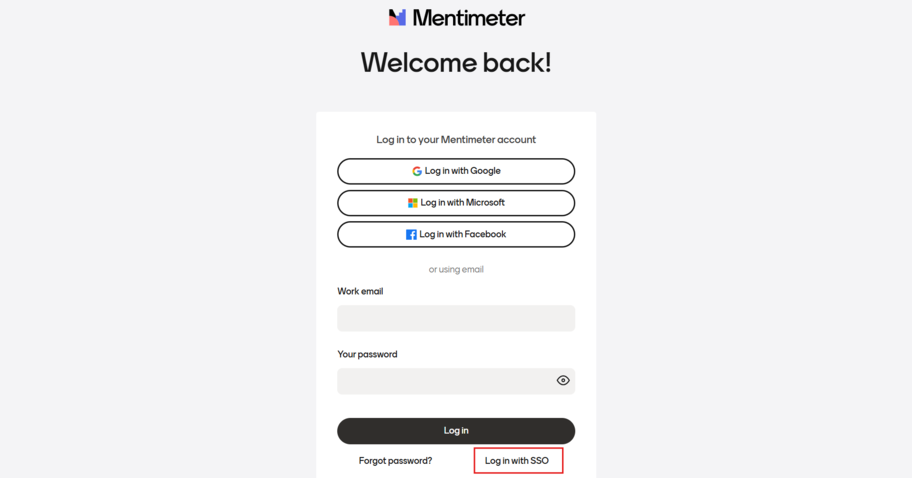
- After creating your account, you can log in to Mentimeter with your Aalto email address at https://www.mentimeter.com. If you are not connected to the Aalto network or VPN is not in use, log in by selecting Log in with SSO.
Mentimeter’s website includes Menti Academy, which provides guides and materials for using the software.
Features
Mentimeter offers versatile ways to engage participants and collect feedback in real time:
- Participants can respond anonymously using their own devices
- Results are displayed in real time and help guide discussions
- Multiple question types, including:
- word clouds
- scales and ratings
- multiple-choice questions
- open-ended responses
- Q&A questions
- Easy reporting: results can be saved and shared
Support
For more information and support, please contact IT Service Desk (servicedesk@aalto.fi)